Automate the obvious. Keep humans in control.
DocuFlow AI pulls data out of invoices, contracts and purchase orders. I designed the review experience: how people check what the AI extracted, fix what's wrong, and send it on for approval.
Product
DocuFlow AI (Neural Connect)
My role
Product designer, extraction and review
Team
2 designers, PM, ML lead, engineers
Status
Designed and prototyped, not launched
The problem
Finance teams typed every field by hand, then a second person checked it all again. Checking took almost as long as typing.
What I designed
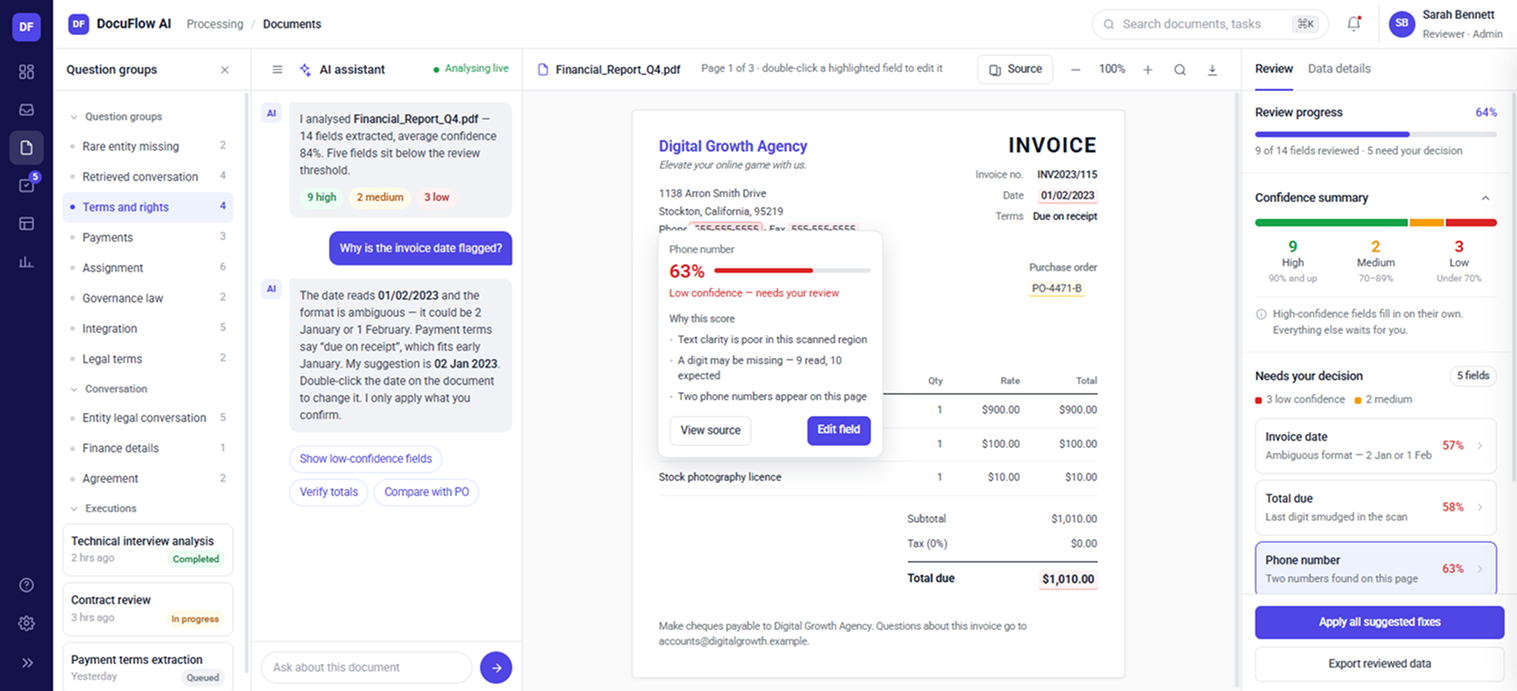
A review flow where the AI fills in the fields and people only spend time on values that are uncertain or important. The source is always one click away.
Where it stands
Designed and prototyped with the ML lead and engineers. It hasn't launched, so I've defined how we'd measure it, starting with the AI mistakes people catch.
01The problem
Every field was typed by hand,
then checked again by someone else.
Invoices, contracts and purchase orders came in by email or through shared folders. Someone opened each one and typed the data into Excel or another system. A second person checked it against the document, and only then did it go for approval.
Six manual steps. The two red ones are the same work done twice, and that's where most of the time went.
What this cost the team
- Time.One invoice took about 10 minutes to type and 5 to check. A reviewer got through roughly 30 documents a day.
- Repeated work.Every document was read twice, once to enter it and once to check it.
- No shared status.Updates lived in email threads and folders, so managers couldn't see what was pending.
- Late errors.Mistakes usually surfaced at approval, after two people had already handled the document.
02My role
I owned extraction and review,
from upload to approval.
I ran the research, made the flows and prototypes, and worked every day with the PM, the ML lead and the engineers. Another designer owned settings and the audit trail screens. We shared one set of patterns so the product felt consistent.
- Extraction and review.How a document moves from upload to approval.
- Confidence.How people read AI confidence and act on it.
- Checking and correcting.How people verify a value and fix it.
- Handoffs.How work moves between reviewers, leads and approvers.
- Dashboards.What each role needs to see.
- UI and design system.Components, patterns and prototypes.
03Research
I sat with people while they did the work.
Before designing anything, I wanted to see where the time went, where mistakes happened, and what made people trust or doubt the data.
Entered data and checked it against the original document.
Assigned work and helped reviewers when they got stuck.
Tracked errors and needed to know what changed, and who changed it.
What I found
Checking took almost as long as typing
People re-read the whole document to check the data, even when most of it was obviously right.
So the screen should point people to the few values that need a look.
They re-read everything because they couldn't see the source
The checker only had the spreadsheet. To verify one value they had to find it again in the document, so they re-read all of it to be safe.
So every value needs to link back to where it came from on the page.
Some fields matter more than others
Nobody worried about a fax number. Everyone double-checked totals, tax numbers and bank details, whatever the system said.
So importance and confidence are different things, and the design has to handle both.
Managers cared about changes, not values
The operations manager didn't need to see every value. They needed to know what was changed, by whom, and why.
So every correction is recorded, and the original value is kept.
04Key decisions
Let the AI handle the easy cases.
Let people make the decisions.
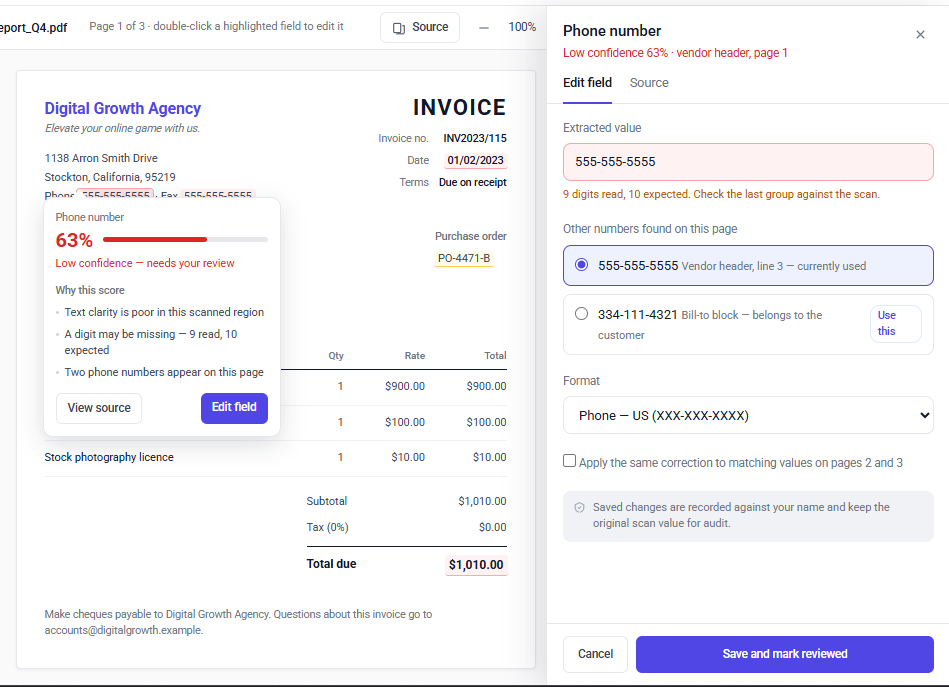
People wanted less checking, but not at the risk of missing a wrong total. So the real question was how the screen tells someone where to look.
01 — Show confidence where it changes what people do
Decision
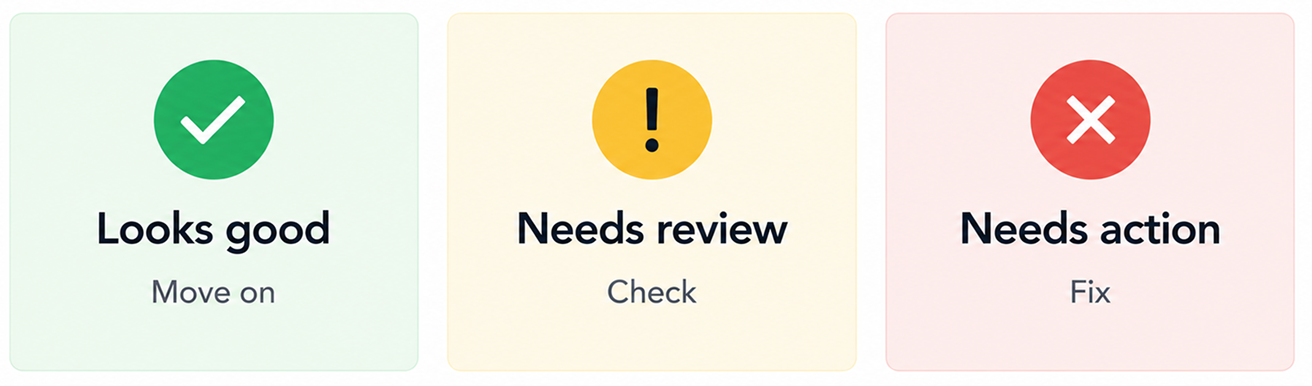
Fields fall into three bands. High confidence (90% and up) fills in on its own. Medium (70–89%) and low (under 70%) wait for a person, with the low ones first.
Why
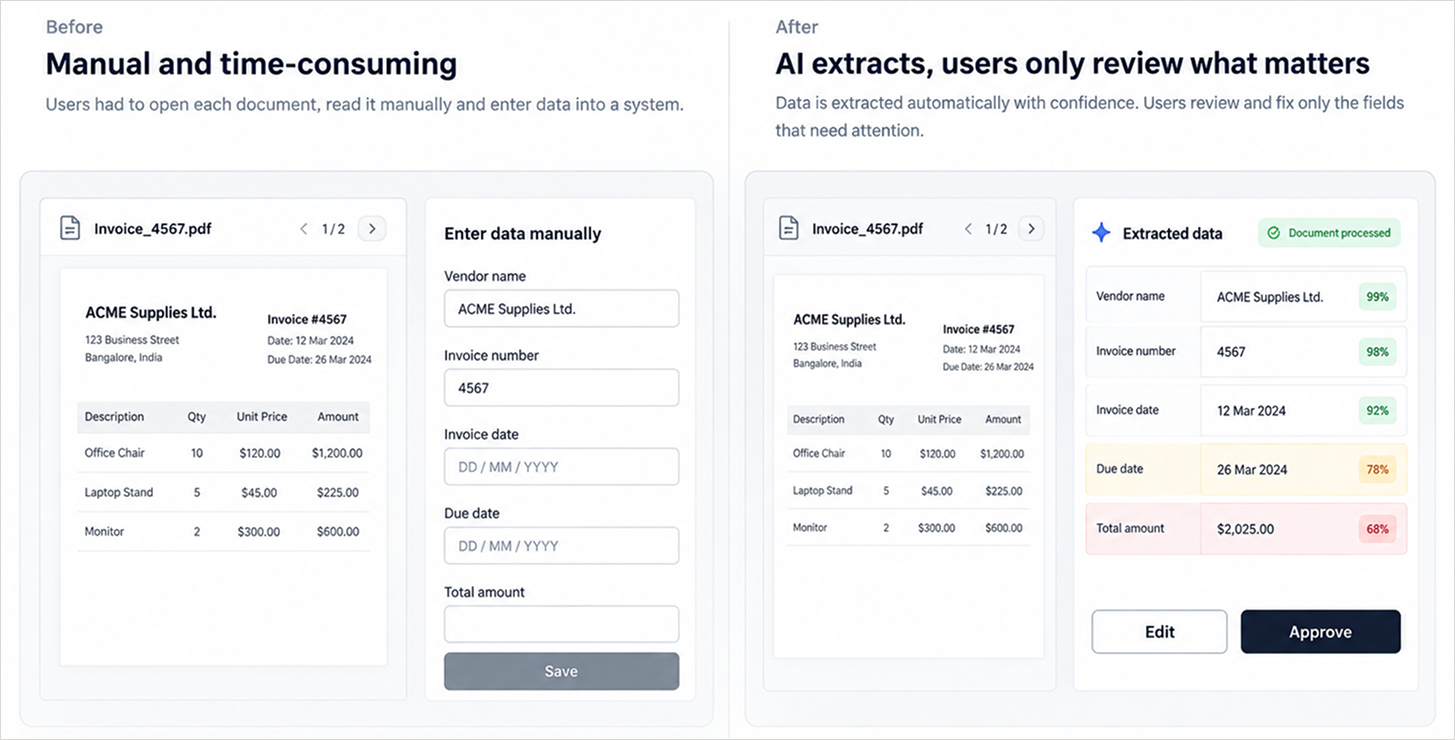
Research showed people re-reading whole documents when most of it was right. Sending them straight to the few fields that need a look, 5 out of 14 on the invoice above, is where the time saving comes from.
02 — Keep the document next to the data
Decision
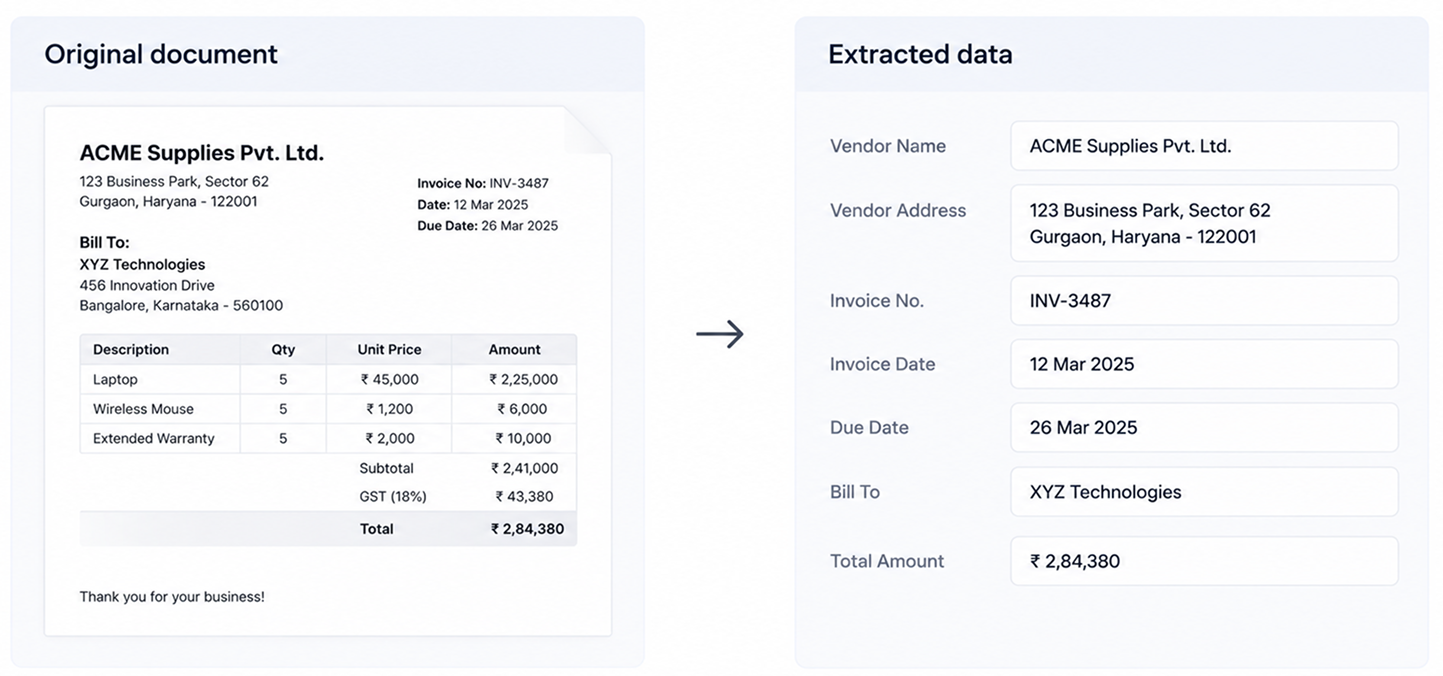
The document stays on screen the whole time. Selecting a field highlights it on the page, and the edit drawer opens beside the document, not over it.
Why
The second check existed because the checker only had a spreadsheet. With the source right there, there's no reason to re-read everything.
05Trade-offs
What I decided not to do.
- Full automation. The AI is sometimes wrong, and in finance a wrong total is expensive. People stay in the loop for anything uncertain.
- A score on every field. Fourteen percentages on one screen is noise. Scores appear where they help someone decide what to check.
- A separate source view. Early versions had Edit and Source tabs in the drawer. The document was already on screen, so the Source tab only repeated it. I removed it and put a small preview of the source line right above the input.
- A screen for each step. Extract, check and approve happen in one place, so people can finish a document without moving between screens.
06The workflow
How the workflow changed.
Before, every field was typed and then checked. Now the AI fills in the fields and the screen sends people to the few that need attention.
WorkflowUpload → Extract → Review → Approve → Complete
07Screen anatomy
The review screen, part by part.
Reviewers spend most of their day here, so every part had to earn its space.
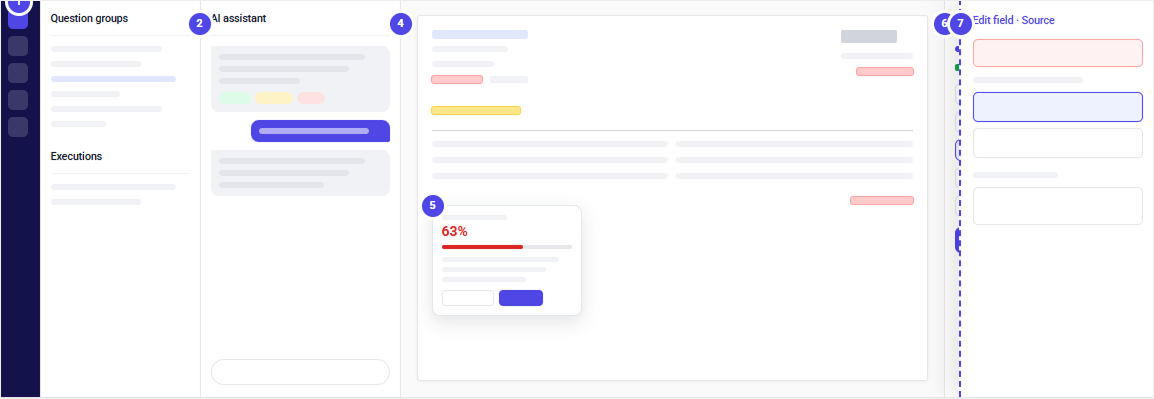
- 1Product railDashboard, inbox, review queue and templates. Labels help new users learn their way around.
- 2Question groupsWhat the AI needs to find. Also works as a filter, so reviewers can focus on one group at a time.
- 3AI assistantExplains why a field was flagged and can suggest a value. It never makes the final call.
- 4DocumentThe original file. Highlights show which values need attention.
- 5Confidence popoverThe score, the reasons behind it, and a way to review the field.
- 6Review panelProgress, the confidence breakdown, and the fields still waiting for a decision.
- 7Edit drawerOpens beside the document, with a preview of the source line above the input, so people compare and type in one place.
08Dashboards
Different roles ask different questions.
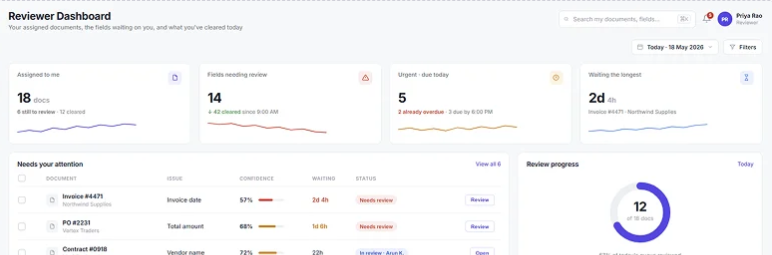
The same document passes through reviewers, team leads and managers. Reviewers want to know what to work on next. Team leads want to see where work is stuck. Managers want to know what changed and how many errors got through.
Below is the reviewer view. It answers one question: what do I need to work on? That means what's assigned to me, what needs review, what's urgent, and what has been waiting too long. The goal is that nobody has to ask a lead what to do next.
09Discover questions
Let the documents suggest the questions.
Problem
Before the AI can answer anything, someone has to write the questions, like "What is the invoice number?". Doing that by hand was slow, and with a new document type people had to guess what it even contained.
Decision
I added Discover questions to Question groups. After uploading documents, the user clicks the wand icon, the AI reads the batch, and it suggests questions it can answer from those documents. The user picks the ones they want and adds them to a group.
Why
It cuts setup time and gets people to useful answers sooner. Nothing is added without the user choosing it, because one wrong question means wrong data on every document after it.
10Audit trail
Every change has a name, a time
and the original value.
The operations manager's question from research was simple: what changed, and who changed it? In finance that isn't a nice-to-have. Auditors ask it too.
The other designer owned the audit trail screens. My part was deciding what the review flow records. We agreed on three rules: the AI's original value is never overwritten, every change is tied to a person, and changes to important fields need a short reason.
| Field | AI value | Final value | Changed by | Reason |
|---|---|---|---|---|
| Phone number63% | 555-555-5552 | Priya S.14 Mar, 10:42 | Last digit faint, checked scan | |
| Invoice date57% | 1 Feb 2023 | Priya S.14 Mar, 10:44 | US date format | |
| PO number96%, spot check | PO-4471-B | Rahul K.14 Mar, 15:10 | B read as 8, checked against PO list |
Timeline
- UploadedAnil M., 14 Mar, 09:58
- Extracted by AI14 fields, model v2.3
- ReviewedPriya S. changed 2 values, confirmed 12
- Spot checkRahul K. fixed PO number at approval
- ApprovedRahul K., 14 Mar, 15:12
This record also closes the loop with the ML team. A person changing an AI value is the clearest signal of where the model is weak, especially when the value was high confidence, like the PO number above.
11Outcome
It hasn't launched yet,
so here's how I'd measure it.
Five measures, using the research numbers as the starting point where we have them.
- Time to review one document. Today it's about 15 minutes: 10 to type and 5 to check.
- Documents per reviewer per day. Today it's about 30.
- Fields still checked by hand. If people keep opening high-confidence fields, they don't trust the bands yet.
- Documents waiting more than a day. Shows whether handoffs got better, not just the review screen.
- How often people change an AI value. Especially high-confidence ones, since those are the misses the model doesn't know about.
What I learned
Start with the decision, not the AI.Work out what the person has to decide, then decide where the AI helps.
A score needs a reason.Confidence is only useful when it tells someone what to do next.
Design for the AI being wrong.The flow matters most on the documents where the model makes mistakes.
Mohit Madan, Senior Product Designer, Bangalore · mohitonline.com